Loco car showroom
A editorial car showroom landing page inspired by Locomotive.ca
PHASE 0 -- Set up media assets
Start by creating your visual assets.
First, generate images using tools like Nano Banana, Midjourney, or any AI image generator. Focus on getting strong, consistent visuals that match the creative direction.
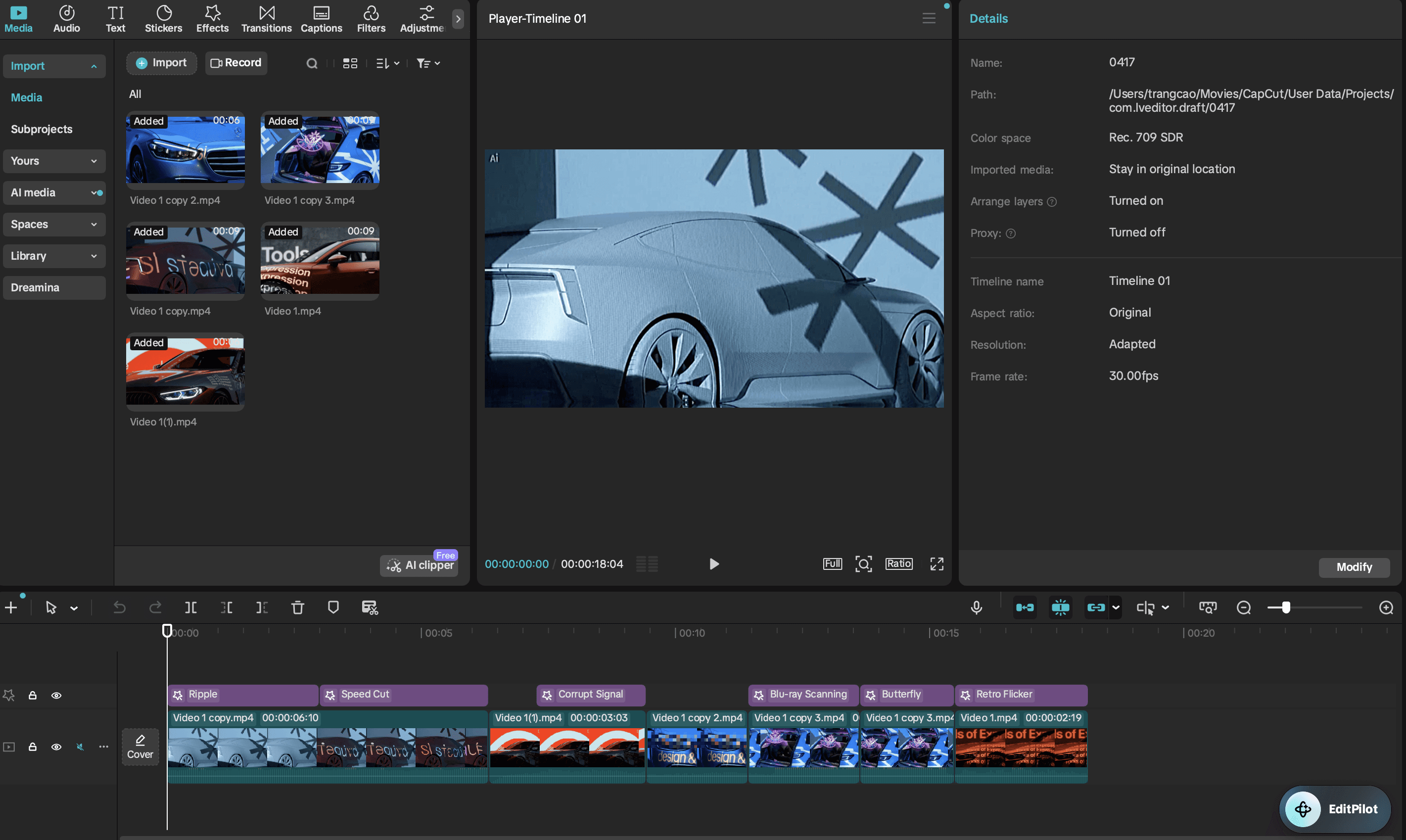
Then, turn those images into short video clips — similar to the banner style — using AI tools like CapCut. Generate each scene as a separate video to keep control over pacing and composition.
Finally, bring everything into CapCut to edit: sequence the clips, refine timing, and add subtle effects to create a cohesive, high-end motion feel.
PHASE 1 — MASTER PROMPT (help Claude to understand the project, media assets, no code)
Tell Claude to analyze the project.
This prompt forces Claude to:
understand the mission (creative car showroom)
not drift into:
car dealership ❌
SaaS ❌
strictly follow:
the editorial design system of Locomotive
You will analyze the attached reference screenshots and my media assets.

MISSION:
Build a premium editorial landing page for a futuristic creative car showroom,
based on the visual system and layout logic of the Locomotive website.

This is NOT:
- a generic car commercial website
- not a dealership
- not a product marketing page
- not a SaaS landing page

This IS:
- a creative studio-style experience
- where cars are treated as artistic objects
- editorial, minimal, and art-directed
- similar to a design agency website, but applied to a futuristic car concept

You may use this reference for context:
https://locomotive.ca/en

However:
- prioritize the attached screenshots for layout, spacing, and typography
- do NOT rely on the link for exact UI replication

---

GOALS:

1. Understand the visual system of the reference:
- layout structure
- typography scale
- spacing and whitespace
- asymmetry
- how media and text interact

2. Identify what makes the design feel:
- editorial
- premium
- minimal
- not generic

3. Translate that system into:
→ a futuristic creative car showroom concept

---

ANALYSIS REQUIRED (DO NOT WRITE CODE YET):

1. Layout breakdown
- header
- hero
- showcase section
- featured work list
- store/product section

2. Typography system
- where serif is used vs sans-serif
- scale differences (nav vs hero vs featured titles)

3. Spacing system
- how whitespace is used
- how asymmetry is applied
- how elements are positioned (not centered, not grid-heavy)

4. Visual tone
- why it does NOT feel like a startup or template
- what makes it feel like an art-directed studio

5. Adaptation strategy
Explain how you will transform this into a futuristic car showroom:
- how the car replaces “projects”
- how media is used
- how content tone changes (less corporate, more artistic)
- how to avoid turning it into a car advertisement

---

IMPORTANT CONSTRAINTS:

- Do NOT write any code yet
- Do NOT suggest generic UI patterns
- Do NOT introduce cards, dashboards, or typical web layouts
- Think like a creative director, not a frontend template generator

---

OUTPUT FORMAT:

- Clear structured analysis
- Bullet points where needed
- Concise but insightful
- No code
You will analyze the attached reference screenshots and my media assets.

MISSION:
Build a premium editorial landing page for a futuristic creative car showroom,
based on the visual system and layout logic of the Locomotive website.

This is NOT:
- a generic car commercial website
- not a dealership
- not a product marketing page
- not a SaaS landing page

This IS:
- a creative studio-style experience
- where cars are treated as artistic objects
- editorial, minimal, and art-directed
- similar to a design agency website, but applied to a futuristic car concept

You may use this reference for context:
https://locomotive.ca/en

However:
- prioritize the attached screenshots for layout, spacing, and typography
- do NOT rely on the link for exact UI replication

---

GOALS:

1. Understand the visual system of the reference:
- layout structure
- typography scale
- spacing and whitespace
- asymmetry
- how media and text interact

2. Identify what makes the design feel:
- editorial
- premium
- minimal
- not generic

3. Translate that system into:
→ a futuristic creative car showroom concept

---

ANALYSIS REQUIRED (DO NOT WRITE CODE YET):

1. Layout breakdown
- header
- hero
- showcase section
- featured work list
- store/product section

2. Typography system
- where serif is used vs sans-serif
- scale differences (nav vs hero vs featured titles)

3. Spacing system
- how whitespace is used
- how asymmetry is applied
- how elements are positioned (not centered, not grid-heavy)

4. Visual tone
- why it does NOT feel like a startup or template
- what makes it feel like an art-directed studio

5. Adaptation strategy
Explain how you will transform this into a futuristic car showroom:
- how the car replaces “projects”
- how media is used
- how content tone changes (less corporate, more artistic)
- how to avoid turning it into a car advertisement

---

IMPORTANT CONSTRAINTS:

- Do NOT write any code yet
- Do NOT suggest generic UI patterns
- Do NOT introduce cards, dashboards, or typical web layouts
- Think like a creative director, not a frontend template generator

---

OUTPUT FORMAT:

- Clear structured analysis
- Bullet points where needed
- Concise but insightful
- No code
You will analyze the attached reference screenshots and my media assets.

MISSION:
Build a premium editorial landing page for a futuristic creative car showroom,
based on the visual system and layout logic of the Locomotive website.

This is NOT:
- a generic car commercial website
- not a dealership
- not a product marketing page
- not a SaaS landing page

This IS:
- a creative studio-style experience
- where cars are treated as artistic objects
- editorial, minimal, and art-directed
- similar to a design agency website, but applied to a futuristic car concept

You may use this reference for context:
https://locomotive.ca/en

However:
- prioritize the attached screenshots for layout, spacing, and typography
- do NOT rely on the link for exact UI replication

---

GOALS:

1. Understand the visual system of the reference:
- layout structure
- typography scale
- spacing and whitespace
- asymmetry
- how media and text interact

2. Identify what makes the design feel:
- editorial
- premium
- minimal
- not generic

3. Translate that system into:
→ a futuristic creative car showroom concept

---

ANALYSIS REQUIRED (DO NOT WRITE CODE YET):

1. Layout breakdown
- header
- hero
- showcase section
- featured work list
- store/product section

2. Typography system
- where serif is used vs sans-serif
- scale differences (nav vs hero vs featured titles)

3. Spacing system
- how whitespace is used
- how asymmetry is applied
- how elements are positioned (not centered, not grid-heavy)

4. Visual tone
- why it does NOT feel like a startup or template
- what makes it feel like an art-directed studio

5. Adaptation strategy
Explain how you will transform this into a futuristic car showroom:
- how the car replaces “projects”
- how media is used
- how content tone changes (less corporate, more artistic)
- how to avoid turning it into a car advertisement

---

IMPORTANT CONSTRAINTS:

- Do NOT write any code yet
- Do NOT suggest generic UI patterns
- Do NOT introduce cards, dashboards, or typical web layouts
- Think like a creative director, not a frontend template generator

---

OUTPUT FORMAT:

- Clear structured analysis
- Bullet points where needed
- Concise but insightful
- No code
PHASE 2 — DESIGN SYSTEM PROMPT
Right now, Claude is at the level of:
🎨 “a creative director who talks well””
Phase 2 forces it to shift into:
🧩 “a design system that can actually be coded”
→ at that point, building code is no longer guesswork
Now convert your analysis into a precise and implementable design system.

Do NOT write full code yet.

Your task:
Turn your observations into a structured design system that can be used to build the site.

---

1. COLOR SYSTEM

Define exact values:

- background color (off-white / light gray)
- primary text color
- accent color strategy (if any)
- rules for when color is allowed vs not allowed

Be specific with HEX values.

---

2. TYPOGRAPHY SYSTEM

Define clearly:

- serif font role (hero, featured cars, editorial sections)
- sans-serif role (navigation, metadata, labels)

Provide:

- font size scale (in px or vw)
  - nav text
  - section labels
  - hero headline
  - featured list titles
  - metadata

- line-height rules
- letter-spacing rules

Important:
- maintain the extreme contrast between small UI text and large display text
- avoid mid-sized generic headings

---

3. LAYOUT SYSTEM

Define:

- overall page width behavior
- margin rules (left/right spacing)
- how asymmetry is applied
- how elements are positioned (not centered)

Explain:

- how the hero text is positioned
- how the showcase section is structured
- how the featured list is aligned
- how the store section breaks the grid

---

4. SPACING SYSTEM

Define:

- spacing scale (e.g. 8px, 16px, 32px, etc.)
- vertical rhythm between sections
- how whitespace is used intentionally
- how to avoid “boxed” layout

---

5. COMPONENT RULES

Define strict rules:

- header behavior
- hero structure (media + overlay text)
- featured list (NO cards)
- store section (editorial layout, not ecommerce UI)

Explicitly list:
- what is allowed
- what is forbidden

---

6. CAR SHOWROOM ADAPTATION

Refine your earlier idea into a system:

- how each car is represented
- naming system (editorial vs product naming)
- how media is used (video vs still)
- what kind of text is allowed (poetic vs technical)

---

IMPORTANT CONSTRAINTS:

- do NOT drift into generic UI
- do NOT introduce cards, dashboards, or marketing sections
- do NOT make it look like a car commercial
- keep it editorial, minimal, and restrained

---

OUTPUT FORMAT:

- structured sections
- bullet points
- concise but precise
- no code yet
Now convert your analysis into a precise and implementable design system.

Do NOT write full code yet.

Your task:
Turn your observations into a structured design system that can be used to build the site.

---

1. COLOR SYSTEM

Define exact values:

- background color (off-white / light gray)
- primary text color
- accent color strategy (if any)
- rules for when color is allowed vs not allowed

Be specific with HEX values.

---

2. TYPOGRAPHY SYSTEM

Define clearly:

- serif font role (hero, featured cars, editorial sections)
- sans-serif role (navigation, metadata, labels)

Provide:

- font size scale (in px or vw)
  - nav text
  - section labels
  - hero headline
  - featured list titles
  - metadata

- line-height rules
- letter-spacing rules

Important:
- maintain the extreme contrast between small UI text and large display text
- avoid mid-sized generic headings

---

3. LAYOUT SYSTEM

Define:

- overall page width behavior
- margin rules (left/right spacing)
- how asymmetry is applied
- how elements are positioned (not centered)

Explain:

- how the hero text is positioned
- how the showcase section is structured
- how the featured list is aligned
- how the store section breaks the grid

---

4. SPACING SYSTEM

Define:

- spacing scale (e.g. 8px, 16px, 32px, etc.)
- vertical rhythm between sections
- how whitespace is used intentionally
- how to avoid “boxed” layout

---

5. COMPONENT RULES

Define strict rules:

- header behavior
- hero structure (media + overlay text)
- featured list (NO cards)
- store section (editorial layout, not ecommerce UI)

Explicitly list:
- what is allowed
- what is forbidden

---

6. CAR SHOWROOM ADAPTATION

Refine your earlier idea into a system:

- how each car is represented
- naming system (editorial vs product naming)
- how media is used (video vs still)
- what kind of text is allowed (poetic vs technical)

---

IMPORTANT CONSTRAINTS:

- do NOT drift into generic UI
- do NOT introduce cards, dashboards, or marketing sections
- do NOT make it look like a car commercial
- keep it editorial, minimal, and restrained

---

OUTPUT FORMAT:

- structured sections
- bullet points
- concise but precise
- no code yet
Now convert your analysis into a precise and implementable design system.

Do NOT write full code yet.

Your task:
Turn your observations into a structured design system that can be used to build the site.

---

1. COLOR SYSTEM

Define exact values:

- background color (off-white / light gray)
- primary text color
- accent color strategy (if any)
- rules for when color is allowed vs not allowed

Be specific with HEX values.

---

2. TYPOGRAPHY SYSTEM

Define clearly:

- serif font role (hero, featured cars, editorial sections)
- sans-serif role (navigation, metadata, labels)

Provide:

- font size scale (in px or vw)
  - nav text
  - section labels
  - hero headline
  - featured list titles
  - metadata

- line-height rules
- letter-spacing rules

Important:
- maintain the extreme contrast between small UI text and large display text
- avoid mid-sized generic headings

---

3. LAYOUT SYSTEM

Define:

- overall page width behavior
- margin rules (left/right spacing)
- how asymmetry is applied
- how elements are positioned (not centered)

Explain:

- how the hero text is positioned
- how the showcase section is structured
- how the featured list is aligned
- how the store section breaks the grid

---

4. SPACING SYSTEM

Define:

- spacing scale (e.g. 8px, 16px, 32px, etc.)
- vertical rhythm between sections
- how whitespace is used intentionally
- how to avoid “boxed” layout

---

5. COMPONENT RULES

Define strict rules:

- header behavior
- hero structure (media + overlay text)
- featured list (NO cards)
- store section (editorial layout, not ecommerce UI)

Explicitly list:
- what is allowed
- what is forbidden

---

6. CAR SHOWROOM ADAPTATION

Refine your earlier idea into a system:

- how each car is represented
- naming system (editorial vs product naming)
- how media is used (video vs still)
- what kind of text is allowed (poetic vs technical)

---

IMPORTANT CONSTRAINTS:

- do NOT drift into generic UI
- do NOT introduce cards, dashboards, or marketing sections
- do NOT make it look like a car commercial
- keep it editorial, minimal, and restrained

---

OUTPUT FORMAT:

- structured sections
- bullet points
- concise but precise
- no code yet
PHASE 3 — BUILD STRUCTURE + CODE (VERSION 1)
🚀 After Phase 3
👉 you will have:
a site that runs locally
a layout that matches Locomotive about 70–80%
not a SaaS template
Now implement the first version of the website using the design system you defined.

MISSION:
Build a static homepage for a futuristic creative car showroom,
based on the Locomotive-style editorial system we defined.

---

TECH STACK:

- Next.js (App Router)
- Tailwind CSS
- clean, minimal code
- no extra UI libraries
- no animation libraries yet

---

STRUCTURE:

Create the following components:

/components
- Header.tsx
- Hero.tsx
- Showcase.tsx
- FeaturedWork.tsx
- ObjectsSection.tsx (store equivalent)

---

SECTIONS TO BUILD:

1. Header
- minimal fixed header
- left: brand name
- center: simple nav (Work, Studio, Objects)
- right: small CTA (Enter / Visit)
- very light presence, small typography

---

2. Hero
- full viewport media canvas
- use /public/hero.mp4
- video must:
  - autoplay
  - muted
  - loop
  - object-cover
- overlay text:
  - bottom-left anchored
  - large serif headline
  - no buttons
  - no marketing paragraph

Text example:
"The Form Exists Before The Machine"

---

3. Showcase (editorial asymmetry section)
- recreate the “Seven Years / Running / 2018–2024” logic
- left: stacked text blocks
- center/right: one large vertical media block
- small metadata text
- very sparse layout

Adapt content to car concept:
- instead of timeline → “First Encounter / Form / Prototype Phase”

---

4. FeaturedWork (car catalogue)
- vertical list
- each item = one car
- massive serif titles
- full width rows
- separated by thin horizontal lines
- no cards
- no images initially
- typography is the main visual

Example:
- AX-01
- MONOLITH
- VEKTOR
- SILENCE FORM

---

5. ObjectsSection (store equivalent)
- editorial layout (not ecommerce UI)
- 2–3 objects (prints, materials, artifacts)
- one large image, one smaller image
- minimal text below
- simple “Acquire →” text link

---

GENERAL RULES:

- light background (off-white)
- black text
- serif = main content
- sans = UI/meta
- NO:
  - cards
  - shadows
  - rounded UI
  - generic spacing
  - centered layouts

---

IMPORTANT:

- build a working page.tsx that imports all sections
- use placeholder content where needed
- ensure layout is responsive
- keep spacing generous
- keep everything minimal

---
Refine the hero section.

Fix these issues:

- do NOT center content
- text must sit bottom-left
- remove any buttons or CTA
- remove marketing copy
- increase headline size significantly
- make it feel like text placed over a media canvas, not inside a layout

Goal:
hero should feel like an art-directed frame, not a landing page block

---
Refine the FeaturedWork section.

Problems to fix:

- remove any grid or card layout
- each item must feel like a standalone typographic row
- increase font size drastically
- reduce visual noise
- add thin dividers between rows
- make it feel like a gallery catalogue

Goal:
the text itself should be the main visual element

___
Refine spacing and layout across the page.

Goals:

- increase whitespace significantly
- reduce density
- push asymmetry further
- avoid perfect alignment everywhere
- remove anything that feels “boxed”

The page should feel:
- calm
- sparse
- intentional
- editorial

Do not redesign, only adjust spacing and layout.

---

OUTPUT:

- full code for:
  - page.tsx
  - each component
  - basic globals.css guidance
- clean, readable structure
Now implement the first version of the website using the design system you defined.

MISSION:
Build a static homepage for a futuristic creative car showroom,
based on the Locomotive-style editorial system we defined.

---

TECH STACK:

- Next.js (App Router)
- Tailwind CSS
- clean, minimal code
- no extra UI libraries
- no animation libraries yet

---

STRUCTURE:

Create the following components:

/components
- Header.tsx
- Hero.tsx
- Showcase.tsx
- FeaturedWork.tsx
- ObjectsSection.tsx (store equivalent)

---

SECTIONS TO BUILD:

1. Header
- minimal fixed header
- left: brand name
- center: simple nav (Work, Studio, Objects)
- right: small CTA (Enter / Visit)
- very light presence, small typography

---

2. Hero
- full viewport media canvas
- use /public/hero.mp4
- video must:
  - autoplay
  - muted
  - loop
  - object-cover
- overlay text:
  - bottom-left anchored
  - large serif headline
  - no buttons
  - no marketing paragraph

Text example:
"The Form Exists Before The Machine"

---

3. Showcase (editorial asymmetry section)
- recreate the “Seven Years / Running / 2018–2024” logic
- left: stacked text blocks
- center/right: one large vertical media block
- small metadata text
- very sparse layout

Adapt content to car concept:
- instead of timeline → “First Encounter / Form / Prototype Phase”

---

4. FeaturedWork (car catalogue)
- vertical list
- each item = one car
- massive serif titles
- full width rows
- separated by thin horizontal lines
- no cards
- no images initially
- typography is the main visual

Example:
- AX-01
- MONOLITH
- VEKTOR
- SILENCE FORM

---

5. ObjectsSection (store equivalent)
- editorial layout (not ecommerce UI)
- 2–3 objects (prints, materials, artifacts)
- one large image, one smaller image
- minimal text below
- simple “Acquire →” text link

---

GENERAL RULES:

- light background (off-white)
- black text
- serif = main content
- sans = UI/meta
- NO:
  - cards
  - shadows
  - rounded UI
  - generic spacing
  - centered layouts

---

IMPORTANT:

- build a working page.tsx that imports all sections
- use placeholder content where needed
- ensure layout is responsive
- keep spacing generous
- keep everything minimal

---
Refine the hero section.

Fix these issues:

- do NOT center content
- text must sit bottom-left
- remove any buttons or CTA
- remove marketing copy
- increase headline size significantly
- make it feel like text placed over a media canvas, not inside a layout

Goal:
hero should feel like an art-directed frame, not a landing page block

---
Refine the FeaturedWork section.

Problems to fix:

- remove any grid or card layout
- each item must feel like a standalone typographic row
- increase font size drastically
- reduce visual noise
- add thin dividers between rows
- make it feel like a gallery catalogue

Goal:
the text itself should be the main visual element

___
Refine spacing and layout across the page.

Goals:

- increase whitespace significantly
- reduce density
- push asymmetry further
- avoid perfect alignment everywhere
- remove anything that feels “boxed”

The page should feel:
- calm
- sparse
- intentional
- editorial

Do not redesign, only adjust spacing and layout.

---

OUTPUT:

- full code for:
  - page.tsx
  - each component
  - basic globals.css guidance
- clean, readable structure
Now implement the first version of the website using the design system you defined.

MISSION:
Build a static homepage for a futuristic creative car showroom,
based on the Locomotive-style editorial system we defined.

---

TECH STACK:

- Next.js (App Router)
- Tailwind CSS
- clean, minimal code
- no extra UI libraries
- no animation libraries yet

---

STRUCTURE:

Create the following components:

/components
- Header.tsx
- Hero.tsx
- Showcase.tsx
- FeaturedWork.tsx
- ObjectsSection.tsx (store equivalent)

---

SECTIONS TO BUILD:

1. Header
- minimal fixed header
- left: brand name
- center: simple nav (Work, Studio, Objects)
- right: small CTA (Enter / Visit)
- very light presence, small typography

---

2. Hero
- full viewport media canvas
- use /public/hero.mp4
- video must:
  - autoplay
  - muted
  - loop
  - object-cover
- overlay text:
  - bottom-left anchored
  - large serif headline
  - no buttons
  - no marketing paragraph

Text example:
"The Form Exists Before The Machine"

---

3. Showcase (editorial asymmetry section)
- recreate the “Seven Years / Running / 2018–2024” logic
- left: stacked text blocks
- center/right: one large vertical media block
- small metadata text
- very sparse layout

Adapt content to car concept:
- instead of timeline → “First Encounter / Form / Prototype Phase”

---

4. FeaturedWork (car catalogue)
- vertical list
- each item = one car
- massive serif titles
- full width rows
- separated by thin horizontal lines
- no cards
- no images initially
- typography is the main visual

Example:
- AX-01
- MONOLITH
- VEKTOR
- SILENCE FORM

---

5. ObjectsSection (store equivalent)
- editorial layout (not ecommerce UI)
- 2–3 objects (prints, materials, artifacts)
- one large image, one smaller image
- minimal text below
- simple “Acquire →” text link

---

GENERAL RULES:

- light background (off-white)
- black text
- serif = main content
- sans = UI/meta
- NO:
  - cards
  - shadows
  - rounded UI
  - generic spacing
  - centered layouts

---

IMPORTANT:

- build a working page.tsx that imports all sections
- use placeholder content where needed
- ensure layout is responsive
- keep spacing generous
- keep everything minimal

---
Refine the hero section.

Fix these issues:

- do NOT center content
- text must sit bottom-left
- remove any buttons or CTA
- remove marketing copy
- increase headline size significantly
- make it feel like text placed over a media canvas, not inside a layout

Goal:
hero should feel like an art-directed frame, not a landing page block

---
Refine the FeaturedWork section.

Problems to fix:

- remove any grid or card layout
- each item must feel like a standalone typographic row
- increase font size drastically
- reduce visual noise
- add thin dividers between rows
- make it feel like a gallery catalogue

Goal:
the text itself should be the main visual element

___
Refine spacing and layout across the page.

Goals:

- increase whitespace significantly
- reduce density
- push asymmetry further
- avoid perfect alignment everywhere
- remove anything that feels “boxed”

The page should feel:
- calm
- sparse
- intentional
- editorial

Do not redesign, only adjust spacing and layout.

---

OUTPUT:

- full code for:
  - page.tsx
  - each component
  - basic globals.css guidance
- clean, readable structure
If this helped, the best thank you from you is a follow + share with one designer friend who needs to see it! More breakdowns coming weekly!!!
— Serena