5 Figma Mistakes That Make Senior Designers Close Your File in 10 Seconds
Full breakdown, the stuff I couldn't fit into the reel.
Each mistake below has:
Why seniors actually care (it's not aesthetic, it's signal)
How to fix it (exact steps)
What "good" looks like so you can self-check
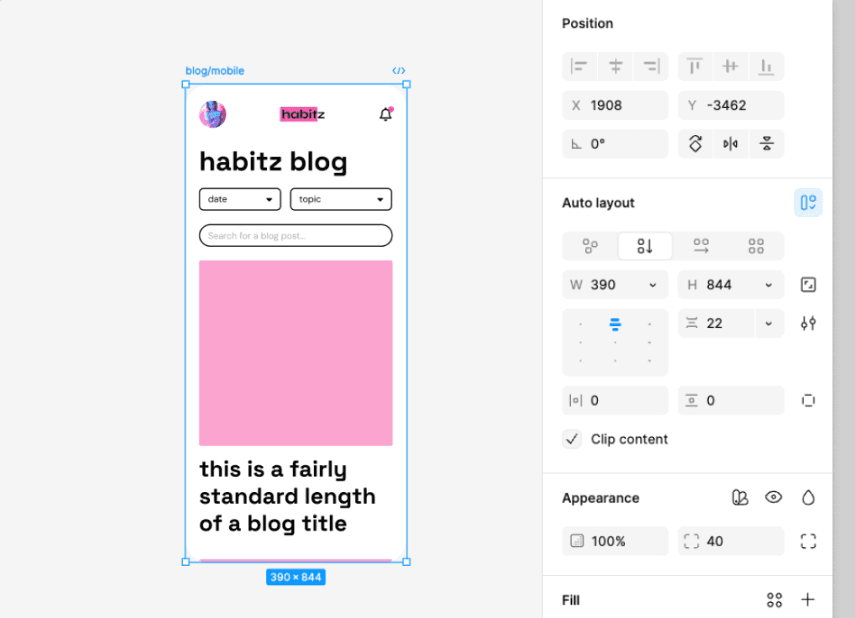
Mistake 1: Not Using Auto Layout
Why seniors care
Auto Layout isn't a Figma feature. It's a mindset test. When a senior opens your file and sees a button group that breaks the second they change one label, they immediately know:
You don't think in components, you think in pixels
You'll struggle with responsive design
Your handoff to devs will be painful (because devs build with flex/grid, which is literally Auto Layout)
How to fix it
Select any frame with multiple elements → press
Shift + AIn the right panel, set:
Direction (horizontal/vertical)
Spacing between items (use a consistent scale: 4, 8, 12, 16, 24, 32)
Padding (same scale)
For each child, decide: Hug contents, Fill container, or Fixed width
Buttons → Hug horizontally, Fixed height
Cards → Fill horizontally, Hug vertically
Containers → Fill both
What good looks like
You can change any text, swap any icon, add or remove a child, and the layout adjusts itself. No manual nudging.
Mistake 2: Layers Named "Frame 247", "Rectangle 12", "Group 89"
Why seniors care
This one's about respect more than skill. When your layers are unnamed, you're saying:
"I never expected anyone else to open this file"
"I don't care about the dev who has to inspect this"
"I don't think about my work as something that gets shipped"
Senior designers and PMs scan layer panels constantly. If they have to click every layer to figure out what it is, they lose patience fast.
How to fix it
Naming convention (pick one, stay consistent):
Examples:
Button/Primary/DefaultButton/Primary/HoverCard/Product/With-imageInput/Email/Error
For frames inside screens:
Header,Hero,Feature-grid,Footer-CTANot
Frame 1,Frame 2,Frame 3
Speed tip: Install the Rename It plugin. Select multiple layers, rename them in batch with regex if needed.
What good looks like
Anyone — designer, PM, dev — opens your file, scans the layer panel, and understands the structure without clicking anything.
Mistake 3: Copy-Pasting Components Instead of Using Variants
Why seniors care
Copy-pasted components are a maintenance bomb waiting to go off. The moment a real design system needs to update — a button radius changes, a hover state shifts, a new size is added — you're hunting through 50 screens.
In a real product team, this isn't just inefficient. It causes inconsistency bugs that ship to users.
How to fix it
Build your base component (e.g., a primary button)
Duplicate it for each state/size you need (Default, Hover, Disabled, Small, Large)
Select all variations → click "Combine as Variants" in the right panel
Define properties:
State: Default, Hover, DisabledSize: Small, Medium, LargeIcon: True, False
Now in any screen, you drop one component and toggle properties
What good looks like
You change the master component once, and every instance across every screen updates automatically. One source of truth.
Mistake 4: Not Using Variables for Colors and Spacing
Why seniors care
Variables are how Figma started speaking the same language as engineering. Every design system in 2026 runs on design tokens: colors, spacing, typography, radius — all defined as variables that map directly to code.
If you're still typing #3B82F6 into a color picker, you're working in 2019. Hiring managers at any company with a design system will check this within 30 seconds of opening your file.
How to fix it
Set up your token foundation (do this once, use forever):
Colors:
Open right panel → Local Variables → Create collection "Colors"
Add primitives:
blue/500,gray/100,gray/900, etc.Add semantic aliases:
text/primary,text/secondary,bg/surface,border/default
Spacing:
New collection: "Spacing"
Add:
space/1(4px),space/2(8px),space/3(12px),space/4(16px),space/6(24px),space/8(32px)
Then apply them: Click any color or spacing field → click the variable icon → pick from your tokens.
What good looks like
The day your brand updates the primary color, you change ONE variable. Every screen, every component, every state updates instantly.
Mistake 5: 47 Pages Called "Untitled", "Copy of Untitled", "Final_v2_real"
Why seniors care
This is the loudest amateur signal because it's the first thing anyone sees. Before they look at a single screen, they see your page list. If it's chaos, they've already formed an opinion.
It says: you can't organize your own thinking, so how will you organize a complex product?
How to fix it
Standard page structure for a portfolio file:
Rules:
Use emoji prefixes — they make pages scannable
Keep page names short:
Onboarding, notOnboarding Flow Final V2Move all dead-end explorations to
Archive(don't delete — process matters)Cover page = title, your name, role, year, 1-2 sentences of context
What good looks like
Anyone opens your file, glances at the left panel for 2 seconds, and knows: this is a finished portfolio piece, here's the structure, I know where to look.
🎯 Self-Audit Checklist
Run this on your portfolio file before you send it to anyone. If you can't tick all 10, fix them first.
File structure
Cover page exists with title, role, year, context
Pages use emoji prefixes and clear names
Exploration/old work is in an Archive page, not deleted
No "Untitled" or "Copy of" pages anywhere
Components & systems
Every reusable element is a Component, not copy-pasted
Components with states/sizes use Variants
A "Components" or "Style Guide" page exists
Tokens
Colors use Variables (not hardcoded hex)
Spacing uses Variables (not random pixel values)
Typography uses Text Styles
Layout & naming
Auto Layout is used on all containers, buttons, cards
Layers have meaningful names (no "Frame 247")
A dev could open this file and ship from it
What to do next
Pick your worst-organized portfolio file
Run the checklist
Fix the top 3 failures
Re-export your portfolio screens
If this helped, the best thank you from you is a follow + share with one designer friend who needs to see it! More breakdowns coming weekly!!!
— Serena